19× more data, the same memory: streams in Node.js
Have you ever wondered how big companies with millions of records generate reports all the time without the system freezing or going down? Imagine a fintech that needs to show reports on a dashboard and, many times, send them later by email or to some bucket.
What streams are
So, how can using streams solve this without putting the system at risk? Streams are collections of data, just like arrays and objects. The difference is that they are not always available all at once and they do not need to be fully allocated in memory (this is the key point), they arrive in chunks, which makes it easier to work with large volumes of data.
The benefit is keeping memory usage constant: since the data is not loaded all at once, you do not overload the server and you do not block the JavaScript event-loop.
The code
As Linus Torvalds said, "talk is cheap, show me the code", so let us get to the code.
async function* readRows(
  filter: FilterQuery<Transaction>,
): AsyncGenerator<ReportRow> {
  const cursor = TransactionModel.find(filter)
    .read("secondary")
    .lean()
    .cursor();
  try {
    for await (const doc of cursor) {
      yield mapRow(doc);
    }
  } finally {
    await cursor.close();
  }
}
Reading from the database
Using workers with async jobs was essential for the system. The worker is responsible for fetching the data in MongoDB, which, by the way, is in a replica set, reading from the secondaries instead of the primary. All of these factors help to handle a large volume of data in an efficient way.
To control the flow of data coming from the database, I use two methods: .lean() and .cursor(). The first one avoids the "hydration" of the MongoDB Document into a JavaScript object, the second one brings the results in batches, which I consume as a generator function.
Tying it all together
export async function generate(input: ReportInput, jobId: string) {
  const fmt = FORMATS[input.format];
  const body = new PassThrough();
  const upload = uploadStream(reportKey(jobId, fmt.ext), body, fmt.contentType);

  await fmt.write(readRows(buildTransactionFilter(input)), body);
  await upload;

  return { downloadUrl: `/reports/${jobId}/download` };
}
In the end, the generate function is the one that ties everything together. It does not read or format anything on its own, its job is to connect the pieces and let the data flow.
The PassThrough
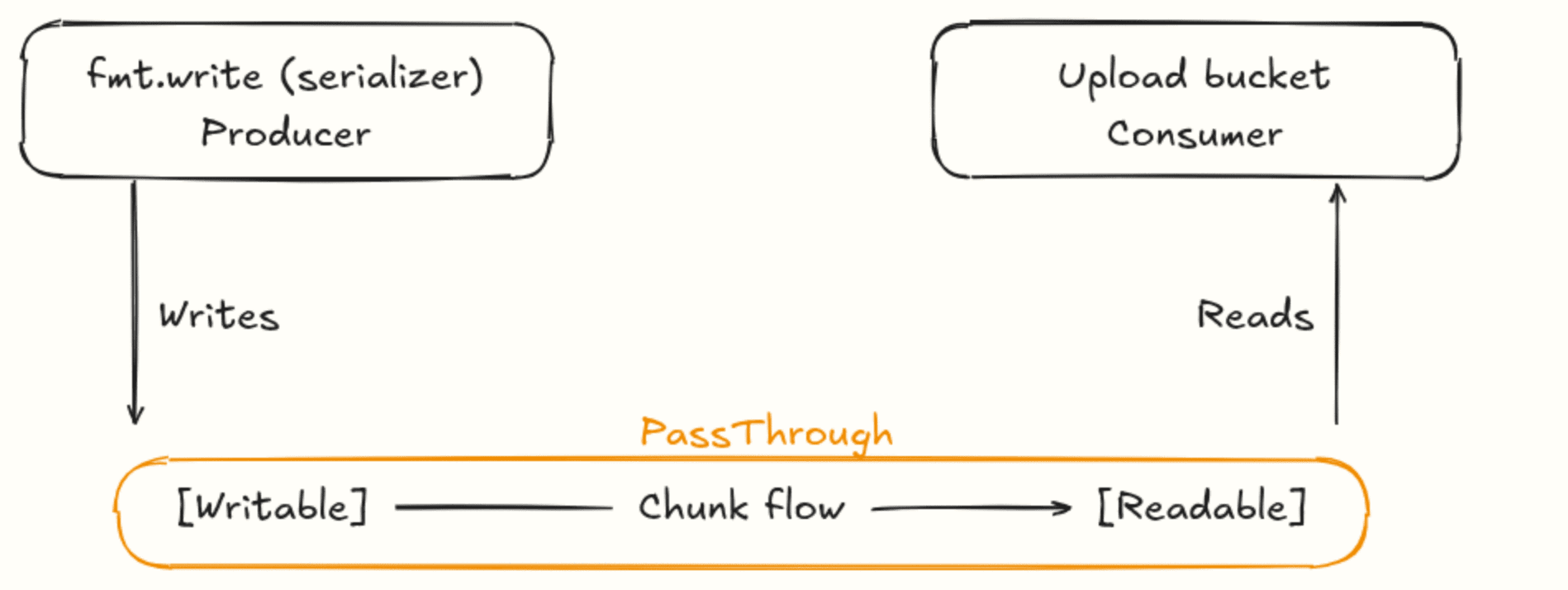
One very important detail is the PassThrough. In the code I have 2 things, the serializer that is responsible for turning the returned rows into some report format (csv, pdf, and so on), so it needs to write, and the upload to the bucket needs to read something (see the image below). The PassThrough is the stream that is both at the same time. Think of it as a pipe: the serializer writes on one end and the upload reads on the other.
Results
With all of these strategies, it is possible to generate reports with about 1 million rows while keeping memory almost constant. I wrote a script to measure the peak of RAM, see the results below.
I measured the memory peak of the process generating the same report in three sizes. From 30 to 365 days, the generated file jumped from 8.9 MB to 169 MB (19× more data). And the peak of RAM? It went up to a ceiling of about 436 MB and stopped there. The clearest case: going from 90 to 365 days, more than quadrupling the data (from 215 thousand to almost 1 million rows), the memory did not move: 437 MB against 436 MB. If I had loaded everything in memory before writing, this report alone would use several gigabytes, with streams, it fits under the same ceiling as any smaller report. The time grows with the volume, as expected! The memory does not.
| Window    |  Rows         | File generated  | Peak of RAM  |
| 30 days   |  51 thousand  | 8.9 MB          | 324 MB       |
| 90 days   |  215 thousand | 37.7 MB         | 437 MB       |
| 365 days  |  969 thousand | 169.6 MB        | 436 MB       |