How I turned the meetings of an adoption support group into posts without exposing anyone
How it all started
A few weeks ago I realized I could start a project to really contribute to a group I am part of, an adoption support group. The meetings happen once a month, and we have a WhatsApp group with 175 people from Tubarão-SC and the region around it, plus a few from outside the state. I noticed that not everyone can make it to the meetings, especially people who live far away. That is where the idea came from: why not create a website for the group and publish, as a blog, what we talked about in the last meeting?
The challenges
Some challenges showed up right away. The first one is that some of the stories told there are personal and include names, cities and other sensitive information. I could not just publish that on the internet without anyone's consent. Besides that, I would have no way to summarize and write a draft in real time during the meeting to publish on the website later.
My idea was to record the meetings and transcribe them, but the problem of the sensitive information was still there. So I thought about using AI to remove that information. But I also could not take the audio of the meeting and send it to a provider like Anthropic, OpenAI or any other.
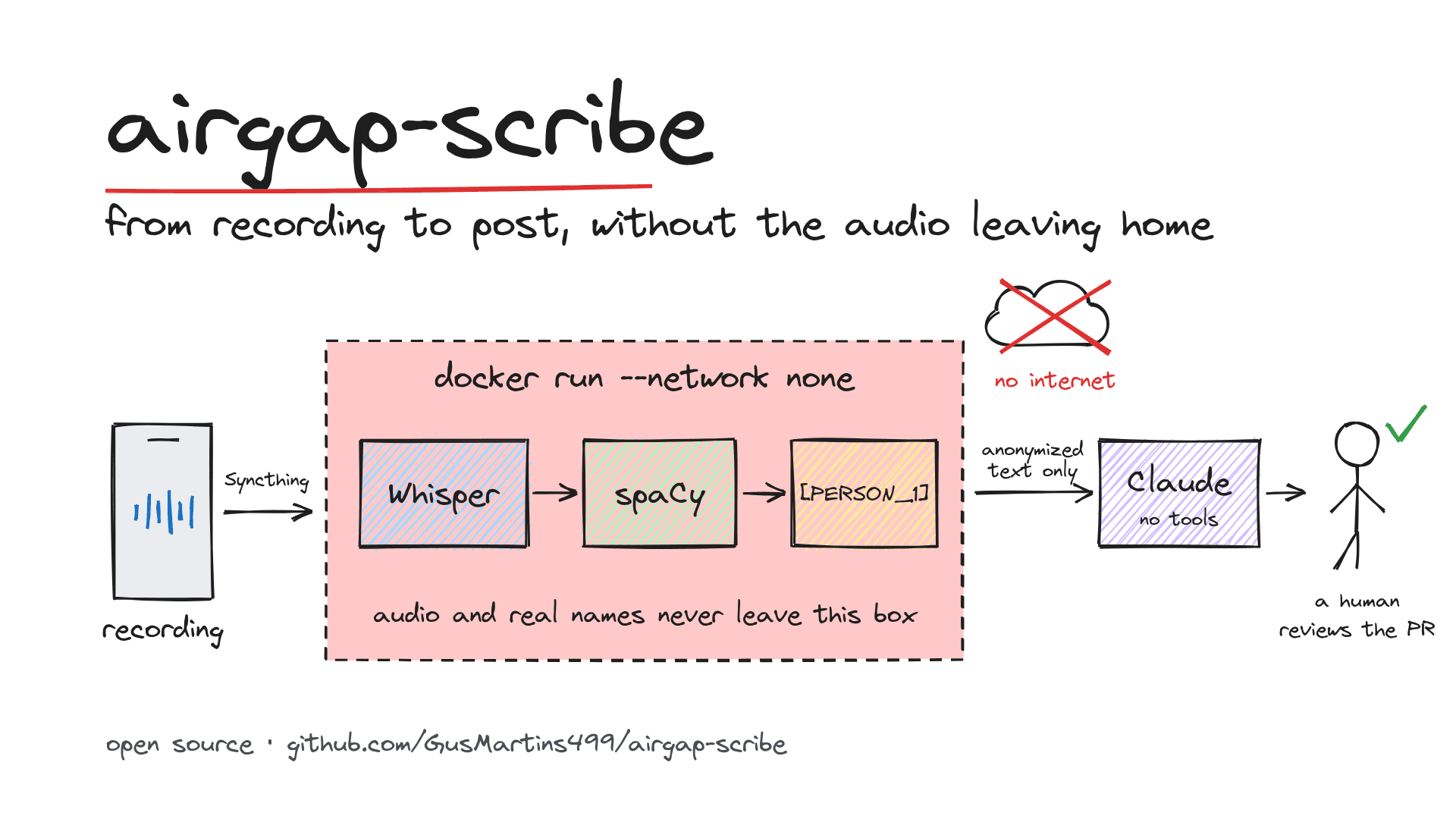
Since the group is a nonprofit organization, spending money was also complicated, so I had to find a way to solve this. I decided to run, locally on my machine, a Whisper model together with an anonymization step. The idea was actually simple: create an application that runs in Docker without internet access, so that no third-party service receives the audio or a transcription with sensitive information. That is how airgap-scribe was born.
Running without internet
Before running the project in Docker, you need to download the Whisper model. Since the container runs with no network, it has no outgoing route and no DNS, so there is no way to download anything inside it. And that is exactly what makes sure the audio does not leave the machine: it is not a matter of trusting that no library will send data out, it is that there is no path for that to happen.
From the phone to the server
I have a personal server, which is actually an old laptop. On it I use Syncthing, and that helped a lot: a few minutes after the conversation ends, I send the audio from my phone to a shared folder, synced over my tailnet, and the transcription starts on its own.
I also set up a service called ntfy to get notifications on my phone. When the draft is ready, I get a notice with the link to the website preview and the link to the pull request. If something goes wrong, I get a high priority notice saying which step failed.
Taking out the names
After the transcription, still inside the container with no network, the anonymization comes in. I use spaCy to find names of people and places and replace them with markers like [PERSON_1] and [LOCATION_1]. The same person always gets the same marker, so the text still makes sense. And if someone is called only by their first name later in the conversation, that name is also replaced.
Where the AI comes in
Only at this point does anything leave the machine, and it is only the text that is already anonymized. It goes to Claude, which writes the draft of the post. Claude runs with all tools turned off: it does not read files, does not run commands and does not access anything other than the text I send. I use a different prompt for each type of meeting, since a talk and a group conversation call for different texts.
Checking again
Name recognition makes mistakes, especially in speech transcription, where the same name can show up spelled in several ways. That is why, when the draft comes back, it goes through a second check, also with no network. It searches the text for the names that were detected, common names from a list and markers that were left over. Whatever it finds becomes a warning.
To be sure this works, the tests generate more than 200 fake transcriptions with known names and typical transcription mistakes. The CI only passes if all the names are removed or flagged. No real audio or transcription goes into the repository.
A person always reviews it
Nothing is published automatically. The draft becomes a pull request in the website repository, with the warnings in the description and a published preview so I can read how it will look. Only after I review and approve it does the text go live. And if someone from the group wants to fix or remove a text, they just need to ask on WhatsApp.
Today is the first real test
Until now airgap-scribe has only processed fake transcriptions, created for the tests. Today will be the first time it receives the recording of a real meeting of the group. I will see if the transcription understands the speech well, if any name gets past the anonymization and if the draft is good enough to become a post after the review.
And speaking of posts, there is still the other half of this story to tell: the website where these texts will be published. How it was built, where it is hosted at no cost to the group and how each draft gets a preview before going live. That is for the next post.
Tools used
All the tools that run on my server are open source:
- airgap-scribe: the project in this post
- Whisper: the transcription model from OpenAI, which runs locally
- whisper.cpp: runs Whisper on the CPU, without needing a graphics card
- FFmpeg: prepares the audio for the transcription
- spaCy: finds names of people and places in the text
- Docker Engine: runs all of this in a container with no network
- Syncthing: syncs the audio from the phone with the server
- Tailscale: the private network between the phone and the server
- ntfy: the notifications on the phone